•
Why I Prefer CLI and TUI over GUI
By Alireza Alavi • 10 minutes read •
Table of Contents
Summary
If I use something often, I will want a CLI or TUI for it.
I think we should almost always take a CLI-first approach to our application development, Then, if the users really need a simpler, more graphical way to interact with your software, create a TUI, and only if the TUI couldn't satisfy the needs of your users, because of the nature of the application or the nature of your users, create a GUI.
CLIs and TUIs are portable, faster, more ergonomic, automate-able, use much less resources, are more stable than GUIs and are simpler to develop and maintain. Therefore, as an end user you will get a more high quality and stable application.
Why
I really enjoy using CLIs and TUIs more than GUI(Graphical User Interface) applications, And I have good reasons for it.
CLIs are deterministic, unlike GUIs. What do I mean by that? You can use a CLI app in a script, call it with some given options and flags, and it will do the same things everytime (unless faced with a problem or bug) while you can't do that with GUIs.
GUIs have less cognitive load for more complicated tasks, and have less of a learning curve, since a good UI will be mostly intuitive to use, but at the same time, they need more attention and need more manual labour. You have to search the whole page with your eyes to find something, and most things use an icon to represent what they do. So, you also have to process and parse the meaning of the icon in your brain, most things are also hidden in menus and sub-menus that you can't easily find.
If I'm doing something often, and I want to be confident in what I am doing, I want a CLI for it. I don't want to parse hundreds of thousands of pixels with my eyes and visually search for things, while using the mouse to click around. It is just very indeterministic and time-consuming. You also can't automate working with a GUI by writing simple scripts. While CLI work can be easily customized and automated.
But I don't mind using GUIs for things that I rarely use, or are visual in nature.
I think the best approach to creating applications is a CLI-first-GUI-later approach, as a lot of good projects take.
You can always build a GUI on top of a good CLI. For example, Mullvad VPN app takes this approach. You don't need the GUI to do anything. Because there is nothing that you can't do with the CLI. There is nothing that is locked behind the GUI.
This provides a lot of robustness for your application while making the engineering and development simpler and more organized.
We see this pattern a lot in the Unix/Linux/FOSS world. Some of our best applications are just very good CLIs, and there are great GUI clients or front-ends for them. Say, Ffmpeg, Curl, Aria2, Git and so on. For example, most GUI download managers are front-ends for Aria2
Now to TUIs. If something can be done with a TUI, I really don't want a GUI for it. TUIs are much, much more performant and use way less resources in development, maintenance and on your computer.
"I don't want to parse hundreds of thousands of pixels with my eyes and visually search for things, while using the mouse to click around."
TUIs also mostly fix this issue. TUIs always have keyboard-driven usage, And much simpler UIs. This makes them much more ergonomic and efficient to use.
In terms of learning curve, it always goes like this (for the same application):
CLI > TUI > GUI
But in terms of efficiency for prolonged and serious usage, it almost always goes like this:
CLI > TUI > GUI
It took me maybe years to get really comfortable with Git's CLI.
While I could just use a GUI like a lot of people do, I mostly stuck with the CLI and powered through it.
Now, I am reaping the benefits. While others are scrambling through some GUI to find out where something is, I just know the command, and I understand how things work on a deeper level.
This specially shows itself when things go south. The person who has always just clicked the "Pull from remote" button from GitHub GUI, while the application handled different commands in the background, usually doesn't really know about what git fetch, git rebase, git merge do.
Hell, They often don't even know the difference between Git and GitHub.
They have chosen to abstract away one of the tools that they use most often, and one of the most critical, behind the GUI. So they are neither comfortable nor familiar with the fundamental underlying tool. So when things go south, They have no idea what to do because there is no "Figure out how I messed up our repository and fix it" button in the git GUI. And even if there was (say, with "AI"), that is going to breed a whole new category of problems when the user doesn't really understand what is going on.
Now I can use a Git UI like Lazygit, because I understand everything that is happening in there.
I can still fully use Git without it, as I do a lot of the time. But the Lazygit TUI makes some things more convenient, like viewing the diff of what I have changed, searching through my previous commits, and providing an overall dashboard for my repository.
I still can use git diff for viewing the diffs. I still can use git stash, git log --graph, git show, git checkout to explore different commits. I still have full control over my repositories, and the tool that I use.
Again, if your application is inherently graphical, TUIs and CLIs might not be a good fit, although I think the base functionality can always be CLI-first.
For example, applications like GIMP, LibreOffice, Kdenlive, Blender etc. might not be good fits for CLI and TUI because they are inherently graphical, working on graphical problems that relies on the user to visually see and interact with graphics. And again, if I don't use something very often, I don't want to remember CLI commands or TUI key bindings for it. I will rather a simple GUI.
For example, I want a GUI for customizing the appearance of my desktop environment (Lxappearance for example), or a GUI for configuring Flatpak app settings (Flatseal) or a GUI download manager (Persepolis). Because I don't use these very often. I don't change my Themes every day. I don't download multiple large files every day and even if I do, its not critical to me. Just opening Persepolis and pasting the URL and forgetting is too simple for me to be using a CLI for it. But if you heavily work with downloads or want to automate them, of course you will look for a CLI method.
There is also the problem of high entropy of GUIs. I can't quite articulate it, but developing and maintaining GUIs, is inherently much harder than CLIs and back-ends (more logic and business oriented tasks). This applies to all web, native and cross-platform applications. "Your GUI application often gets deprecated before you finish v1". And after you have finished it, maintaining it is the harder part. You need to constantly babysit it so it keeps running. I don't quite understand why this problem is, but the GUI world and ecosystem just evolves so rapidly that it's very hard to keep up with it. While you might have written a CLI 30 years ago and it would still work and be fine. My dad actually has a TUI finance app that he wrote 30 years ago and still uses it for managing his finances.
The GUI ecosystem just doesn't mature like back-end programming did. We have totally figured out how to create great CLIs and back-ends for ages, but are totally lost when it comes down to GUI development.
Maybe one problem is that the CLI and back-ends don't need to really worry about the client, their display size, how do they interact with the app (touchpad?, mouse?, keyboard?, touch screen?). The whole world of GUI development is indeterministic and chaotic, and I think we haven't figured it out yet.
Always keep in mind: A CLI that is hard to work with, but works, is always better than a broken GUI.
Real world cases
Here is both btop and xfce4-taskmanager opened together and compared:

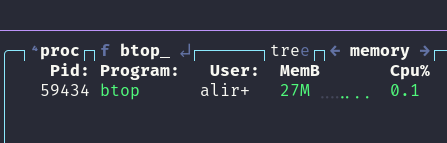
They both do the same thing. Both monitor and show system resource usage, and Btop does it arguably better, with more information and simpler operation, using the keyboard.
Btop uses 27MB of RAM, while xfce4-taskmanager uses 50MB of RAM.
Note that xfce4-taskmanager is one of the most lightweight GUI task managers out there, and it takes almost twice the RAM.
The 23MB of RAM that Btop saves you might not be life changing, but it is a pattern. These 2x, 3x usages start adding up pretty fast.
And also, you can use Btop anywhere, on a server or on your computer with no graphical server when it inevitably brakes at some point. This is the case for all CLI/TUIs
Now let's compare my favorite text editor, Neovim, with VSCodium (which is a better fork of VSCode, with removed bloat and telemetry).
I have 46 plugins installed on Neovim, the thing I use 95% of time to work (using it right now to write this), and 15 plugins installed on VSCodium (which I haven't used in almost a year).
I have the same projects opened in both of them.


That is almost 4.7x ram usage. That is no joke. That's why I always have 10GB of free ram on my laptop with 16GB of ram, while some of my friends are working with sluggish systems, waiting for the system to respond to their each click, and they think they need more hardware resources. These differences add up.
There is another thing; Sometimes, I don't even need a Desktop environment or any GUI at all!
I just login via a TTY and get things done, in a much snappier system while using much less resources. If my workflow depended on GUI apps, I couldn't do this. But most apps I use are available even over an SSH connection or in a TTY session.
I also work a lot on servers, so having this workflow helps my productivity and quality of life a lot.
If you want to see a list of TUI and CLI apps that I use, see my box of cool CLI/TUI tools.