•
My Box of Cool CLI/TUI tools
By Alireza Alavi • 14 minutes read •
Table of Contents
Preface
Here is a list of CLI(Command Line Interface) and TUI(Terminal User Interface) applications that I love and use often. I list them here so I don't forget about them, and maybe others(you) might find them useful.
Read about why I prefer CLI and TUI over GUI.
There also exists extensive lists of CLI and TUI tools ( see other cli tui lists), This is just my list.
The lists aren't written in any particular order.
Non-obvious ones
These are less common applications.
Aerc
E-mail is definitely my favorite way of messaging, and arguably one of the greatest and most successful methods of communication ever created. It is simple, effective, and truly decentralized (although big tech hates that and is trying to kill the decentralization).
Aerc is a TUI E-mail client.
Lightweight, efficient, amazing integration with git's email based workflows.
If you work with email based git workflows, Aerc is absolutely amazing. But even if you don't, I think it is still great for E-mail communication. Using it is pretty simple and the UI is pretty simple with little learning curve.
I still use Thunderbird as my main E-mail client mostly because of the calendar which I heavily use for both my work and personal life, and BiDi text support which the TUI/CLI world doesn't really support yet, although using Aerc with a BiDi capable terminal like Wezterm and good font renders OK RTL text.
Note that Aerc stores your password in clear text in the config file by default, which is bad. You should use a password manager like pass to store your password and read it from Aerc's config.
For example, add this to your config and remove the clear text password:
source-cred-cmd = pass my/password/nameBombardier
bombardier is a HTTP(S) benchmarking tool.
If you want to stress test your server or application, you want to bombardier it with gazillion requests to tests it's limits.
Bombardier does exactly that. And figuring out how to use it is as simple as bombardier --help.
I'm also a huge fan of how the provide an AppImage format of the binary. I always like that.
Also checkout wrk
wrk
wrk is a modern HTTP benchmarking tool capable of generating significant load when run on a single multi-core CPU.
According to bombardier's wiki, wrk is 1.5-2x faster than bombardier.
Also check out bombardier
Hyperfine
Hyperfine is a great and yet very simple program benchmarking tool.
Yes, there are built-in or libraries in most languages for benchmarking within your code, but having a simple benchmarking tool that doesn't care about what your program is or does, and just runs it and tests it can be really great.
For example, if have have written the same program or algorithm in multiple languages and want to benchmark the performance as a black box, hyperfine is the tool. Or if you want to benchmark programs that you haven't written, don't know anything about them and don't have access to their code.
HTTPie
Postman is for babies; real men use curl. But there is also a great middle ground, and it is called HTTPie.
HTTPie is an HTTP client that does absolutely everything you need from a sane HTTP client.
No, we don't need API mocking (that's why you have Prism), project management and mini-games in an HTTP client which takes 30 seconds to load and takes up 3GiB of ram.
HTTPie provides both a GUI which is great and simple, and CLI commands http and https.
It also supports GraphQL requests.
http-server
The name is pretty self explanatory, which I always like.
If you want to serve some static files, say, your static website for showing it to others or development, you will need an http server and http-server is great at doing that!
Install it using npm or whatever js package manager you are using.
I like to install it with Volta.
Transmission-cli
Torrent client for the cli. Also has Qt and GTK GUI clients.
Btop
If you ask me, Btop is the king of task managers. You can think of it as htop with lots of added functionality and pizzazz.
It's been my default task manager for years, both on my personal computers and on servers.
fd
From it's manpage: "Find entries in the filesystem". "A simple, fast and user-friendly alternative to find". I will emphasize on the "Fast" part.\
As simple as fd .html to find all files that have ".html" in their name, in your current directory and all it's subdirectories.
fzf
Interactively search within basically anything.
fzf - a command-line fuzzy finder
fzf is an interactive filter program for any kind of list.- fzf manpage
But what is a "fuzzy finder"? Well it all goes back to some complicated math and logic from "Fuzzy math" and "Fuzzy logic" which is pretty amazing, but in short, fuzzy can mean "not exactly, but it's close".
By running fzf, by default it will be searching within your files in the current directory.
For example, searching for "stry" will match all these files:
- .bash_history
- some/path/story_time.txt
- stream/your_file.md
Or you can search within the contents of a file:
cat huge_file.md | fzf
Or within a some specified files. Remember fd? These two pair up beautifully together:
fd -t file --hidden .conf | fzf --preview "cat -n {}"
This will find all files, even the hidden ones, that their names contain ".conf" and then you can interactively search within them using fzf and preview each file with cat.
I should also note that it is really fast!
This blog post by redhat on fzf is pretty good for some tricks.
TODO: how to search the contents of multiple files with fzf?(email me if you know)
rg (ripgrep)
The new "grep" in town.
recursively search the current directory for lines matching a pattern
- ripgrep manual
I think most of the benefit of rg over grep comes down to it's better performance. rg is very fast. For example, running rg "init.lua" in my home directory, which contains tons of files, returns all the results in 7 seconds, while grep -r "init.lua" took 4 minutes to complete! That is a huge difference.
Cool tip: You can search for something in your git project, only in files that are tracked by git with rg [pattern] $(git ls-files).
This is much faster than using git grep [pattern]
But don't sleep on the good old grep either. It's still very good and installed on every Linux system.
lnav
lnav is a log navigator that does exactly that. It gives you unbelievable power in navigating log files.
It has vim like bindings and interface, and has many features that makes it so efficient and simple to navigate and monitor log files. I always have it on my servers.
Lynx
a general purpose distributed information browser for the World Wide Web
- Lynx manpage
A good website shouldn't rely on CSS and Javascript to deliver content and information to you.
Sometimes, you can use your favorite websites only with a terminal, without opening up a browser that eats 3GB of ram.
A lot can be done with just HTML. HTML is the whole driver of the web. Don't underestimate it.
And it's also always good to test your website with Lynx to see if your website is usable and correct from it. If yes, it shows that your website is correctly structured, the HTML is correct and your website doesn't rely on CSS and JS for functionality.
Here is how this page looks in Lynx:
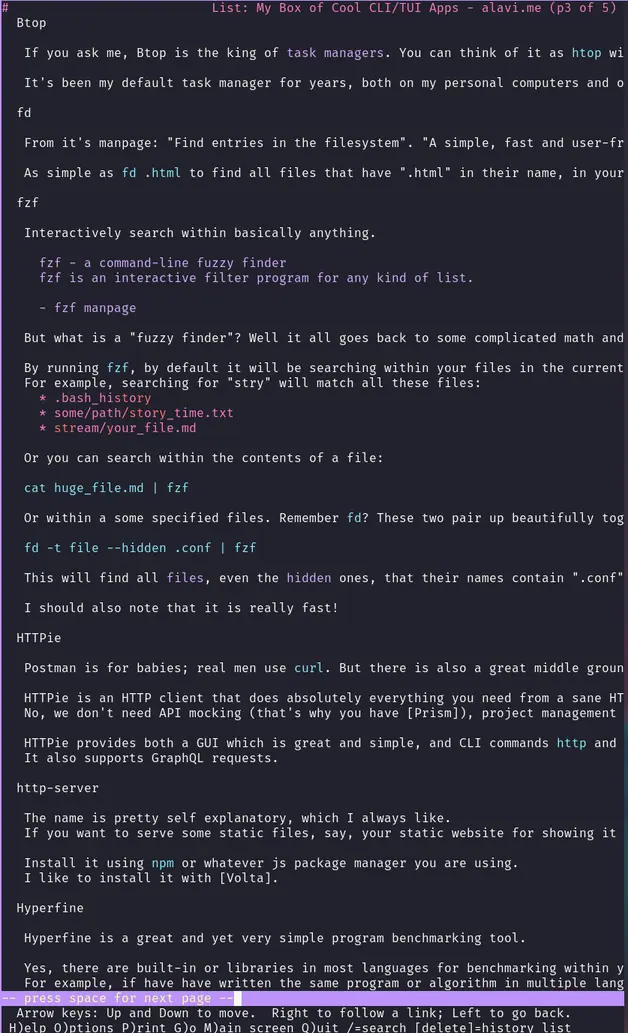
A big downside of Lynx for me is that it doesn't support RTL and BiDi text.
w3m
While Lynx is the OG TUI web browser, w3m is somewhat more modern.
- It uses Vim like bindings for navigation (which is always a good thing)
- can handle image rendering if your terminal supports it
- supports RTL text if your terminal supports it.
There is also Chawan which is a newer TUI web browser but I couldn't run it after installing it on arch so I can't tell if it's better or not.
Here's a comparison of a website that uses RTL text in Wezterm (left is w3m right is lynx) 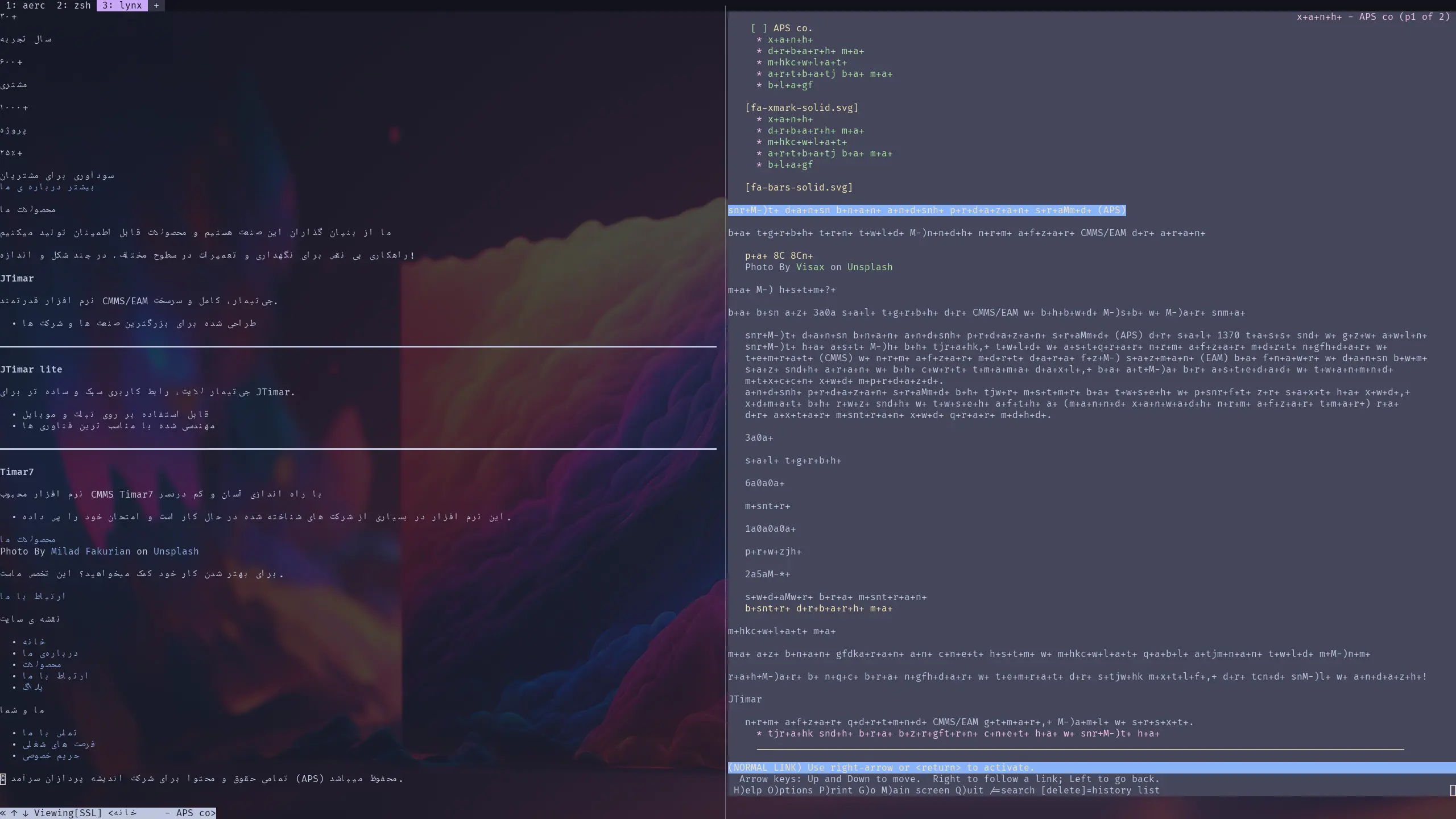
As you can see, lynx renders gibberish.
I have to say, using and navigating w3m is much simpler than lynx.
nnn
nnn (n³) is a full-featured terminal file manager. It's tiny, nearly 0-config and incredibly fast.
It uses vim-like bindings and is hassle free, fast and simple. I tried ranger for a while but it wasn't as fast and it kept crashing.
Weechat
The extensible chat client (mainly IRC).website
I use it everyday for communicating via IRC (we all the real good stuff are in IRC). It has vim-like keybindings which is a great plus.
Prism
Turn any OpenAPI2/3 and Postman Collection file into an API server with mocking, transformations and validations.
pass
pass - stores, retrieves, generates, and synchronizes passwords securely
- pass manage
One must have tool. It can be managed with git so you don't lose track of your passwords.
This can be very useful both for personal usage and for usage within teams. Usually, within a team you will have lots of passwords that you have to share, and I think this can be a very convenient, secure and simple way of doing it.
You should use gpg to encrypt your passwords in pass
tldr
It is like man but much more concise, with examples.
Of course, this doesn't replace man but it is great for quickly being reminded how to use something
tldr curl
tldr ffmpeg
Tmux
Tmux is a terminal multiplexer.
What does that mean?\
When working with a terminal, be it a TTY session, an SSH connection, or even your terminal emulator, you only get one terminal to interact with.
With a multiplexer like tmux, you can have many terminals within one terminal.
You can create new tabs, splits and sessions.
A huge benefit of tmux is the idea of sessions. If you are working with a bare terminal, closing the terminal will kill all the processes that are running within it. But if you are working in a tmux session, closing the terminal doesn't kill the session, so you will not lose your work.
For me, tmux is a must-have both for my personal computers and on servers. It makes you much more productive, and makes using the terminal much more enjoyable, powerful and versatile.
I have heard of Zellij, the new terminal multiplexer in town, but I can't find enough reasons to switch to it. Tmux does everything I want.
Lazygit
A Git TUI for the lazy.
This is my go-to Git frontend. Although I believe you should not be reliant on simple abstractions for your critical software like Git, if you actually understand what is going on, Lazygit is the best Git front-end I know of.
Delta
Delta is a very cool git pager for showing much better diffs with git.
You can also use it with lazygit so lazygit uses delta for it's diffs (see how)
Tokei
Tokei gives you stats about your code project, like how many lines of code it has, what languages are used and in what proportion.
Here, it's simpler with an example:
jsc on feat/advanced-filter-db
❯ tokei
===============================================================================
Language Files Lines Code Comments Blanks
===============================================================================
Clojure 40 1720 1436 116 168
CSS 1 57 48 0 9
Dockerfile 1 15 8 1 6
Edn 5 1142 1091 25 26
JavaScript 3 40 34 1 5
JSON 1 43 43 0 0
Makefile 1 14 10 0 4
XML 3 70 67 3 0
-------------------------------------------------------------------------------
Markdown 3 396 0 290 106
|- Clojure 2 14 9 5 0
(Total) 410 9 295 106
===============================================================================
Total 58 3497 2737 436 324
===============================================================================It's not super useful, but it's fun.
SCC
SCC is similar to tokei, it has some additional features like price estimation of project, time estimation, unique lines of code, etc.
exiftool
exiftool - Read and write meta information in files
Your files, including your images, videos or anything else, can contain EXIF and other meta data.
While this can be good, sometimes, it can be a security and safety problem.
You might share an image with someone or share it on your website, and within the EXIF data of that image might be your location, And people that you don't want might be able to find your location.
This tools helps you remove or add these kinds of data to files.
Zoxide
zoxide - a smarter cd command
It keeps track of the directories you use most frequently, and uses a ranking
algorithm to navigate to the best match.I heavily use Zoxide. It remembers the directories that you visit and ranks them, so you can navigate around your system with fuzzy matching and much more efficiently.
Let's say I have these directories:
/mnt/work/projects/foo/mnt/work/projects/personal/foo/mnt/work/projects/baz
If I have previously z'd into them (z /mnt/work/projects/foo), z has added them to it's database and now I can navigate to them just with z foo, z personal/foo, z baz. This is amazingly simple and fast.\
Remember it also uses fzf so you don't even need to type the filename fully or correctly.
You can go to /projects/myBigProjectName with z projecna.
Obvious ones
These are more well-known applications, which don't need lots of introduction (Who doesn't use git or curl?).
curl
curl is a tool for transferring data from or to a server using URLs.
Most software engineers know curl, but if you don't, you are definitely using it.
From your, computer, smartphone, Car, Fridge or anything that connects to the internet or needs to communicate with somewhere using URLs (why the hell do fridges and cars need to be connected?), they are probably using curl.
The most common use-case for me is either downloading files and html pages, or using it as a HTTP client to make requests to HTTP endpoints (like I said, postman is for babies).
Git
The king of SCM.
Who doesn't know git?
I can praise git for hours but I don't think it needs much praise.
GPG
gpg - OpenPGP encryption and signing tool
It is a tool to provide digital encryption and signing services using the OpenPGP standard. gpg features complete key management and all the bells and whistles you would expect from a full OpenPGP implementation.
If you don't know about OpenPGP, in short you can digitally sign things, you can encrypt and decrypt things with GPG.
This is how Email encryption works. If you want to send end-to-end encrypted (E2EE) emails, you should use GPG. If you want to send anything with E2EE, GPG is a great way to do it.
Neovim (nvim)
The greatest text editor of all time (let's start a war), and the tool I spend most of my time using.
Objectively the greatest keybindings ever(Vim bindings) paired with great performance and beautiful, simple extensibility using a great programming language: Lua. Although I use "fennel" for configuring it, which compiles to Lua with nfnl. What can I say, I'm a sucker for Lispy languages.
networkManager TUI (nmtui)
I remember people giving lots of hate to nmtui for it's instability.
I have to agree, it isn't very stable and crashes often, but it gets the job done.
Many times, you don't have access to a GUI for configuring NetworkManager (which is what most desktops use for network managing) and nmtui gets simple tasks like connecting, disconnecting to internet or changing configuration done.
Honorable mentions
Wezterm
I know it's not a TUI or CLI app, but we mostly use CLI and TUI apps inside our terminal emulators.
Although I like using a simple bare bones emulator like Alacritty or foot with [tmux], Wezterm is so lovely that I can't help but giving it a shout out.
It has enough features but not too much, simple config, great documentation, cross-platform and one of the main features that makes me keep using it for some things, is that it is one of the few emulators that supports BiDi and RTL text which is pretty important for me as a Farsi speaker.
Too bad Neovim/vim still don't support BiDi text which is really odd. I really don't know anything about text rendering and BiDi but I want it so much that I might learn it to try and add it to Neovim.
ttyper
Typing speed test in the terminal